
Kia Cee'd: Back View Camera System / Repair procedures
| Removal |
| 1. |
Disconnect the negative (-) battery terminal.
|
| 2. |
Open the tailgate and remove the tailgate trim.
(Refer to Body - "Tailgate Trim")
|
| 3. |
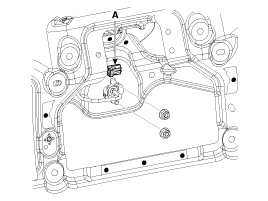
Disconnect the back view camera connector (A) and the remove 2 nuts.
|
| 4. |
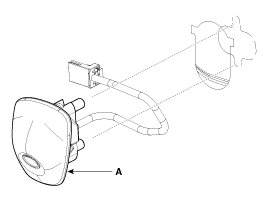
Remove the back view camera (A).
|
| Installation |
| 1. |
Install the back view camera and connect the connector.
|
| 2. |
Install the tailgate trim.
|
 Description and operation
Description
To provide the driver the rear of the vehicle, the backview camera receives
the vehicle rearview image signal and displays the image on the AV head unit
monitor or on ...

Other information:
Kia Cee'd JD Service Manual: ETC (Electronic Throttle Control) System Repair procedures
Inspection
Throttle Position Sensor (TPS)
1.
Connect the GDS on the Data Link Connector (DLC).
2.
Start the engine and measure the output voltage of TPS 1 and 2 at C.T.
and W.O.T.
Specification: Refe ...
: Vehicle Identification
Locating the Vehicle Identification Number
The vehicle identification number is on the
left-hand side of the instrument panel.
Note: In the illustration, XXXX is
representative of your vehicle identification
number.
Vehicle Identification Number Overview
The vehicle identification number contain ...
© 2017-2026 www.kceed.com
