
Kia Cee'd: Audio / Multimedia Jack Description and operation
Kia Cee'd JD Service Manual / Body Electrical System / Audio / Multimedia Jack Description and operation
| Description |
The multimedia jack on the console upper cover is for customers who like to
listen to external portable music players like the MP3, iPod and etc., through
the vehicle's sound system when it is linked to this jack. The customer has
this added option.
In case of distortions from media connected to the AUX source, the audio unit
may not be defective but the output level of the used media does not match the
specification of the AUX input.
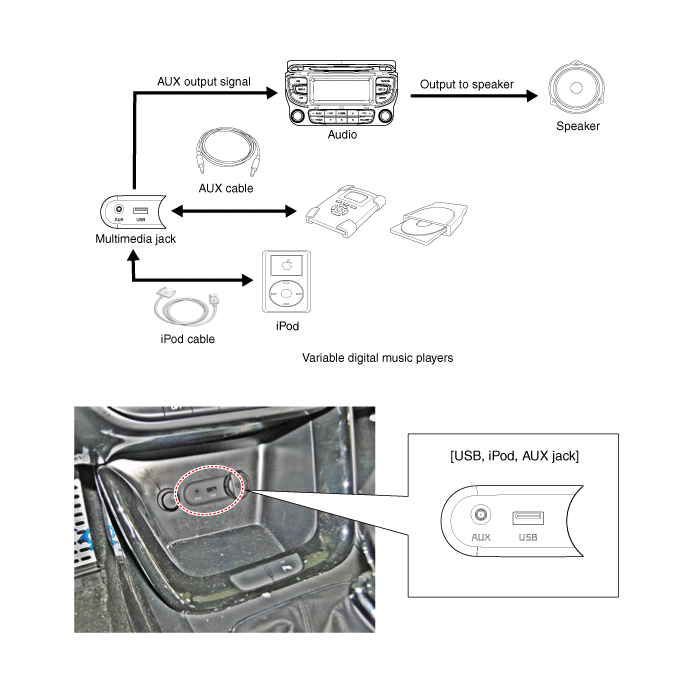
 Multimedia Jack Schematic diagrams
Circuit Diagram
No
Terminal Description
Condition
Specified Condition
1
USB /iPod power
...
 Multimedia Jack Repair procedures
Removal
1.
Remove the crash pad center lower panel.
(Refer to Body - "Main Crash Pad Assembly")
2.
Disconnect the cra ...
Other information:
: Customizing the Instrument Cluster Display - Vehicles With: 6.5 Inch
Instrument Cluster Display Screen/12.3 Inch Instrument Cluster Display Screen
Adding Screens Using Select Screens
Select Select Screens.
Use the controls on the steering wheel
to highlight a screen to add.
Press the OK button.
Note: The amount of screens you can add
is limited, if the selected screen does not
appear you must deselect screens from the
select screens ...
Kia Cee'd JD Service Manual: Rear Door Latch Components and components location
Component Location
1. Rear door latch
...
© 2017-2026 www.kceed.com
