
Kia Cee'd: Crash Pad / Main Crash Pad Assembly Repair procedures
Kia Cee'd JD Service Manual / Body (Interior and Exterior) / Crash Pad / Main Crash Pad Assembly Repair procedures
| Replacement |
|

|

| 1. |
Remove the front pillar trim.
(Refer to Interior Trim - "Front Pillar Trim")
|
| 2. |
Remove the cowl side trim.
(Refer to Interior Trim - "Cowl Side Trim")
|
| 3. |
Remove the cluster fascia upper panel.
(Refer to Crash Pad - "Cluster Fascia Panel")
|
| 4. |
Remove the instrument cluster.
|
| 5. |
Remove the audio unit.
|
| 6. |
Remove the crash pad center lower panel.
(Refer to Crash Pad - "Crash Pad Center Panel")
|
| 7. |
Remove the steering wheel.
|
| 8. |
Remove the multifunction switch assembly.
|
| 9. |
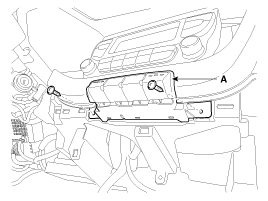
After loosening the mounting screws, then remove the center swtich (A).
|
| 10. |
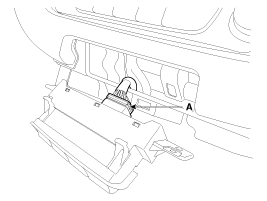
Disconnect the center swtich connector (A).
|
| 11. |
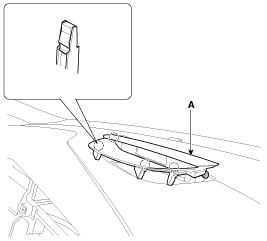
Using a screwdriver or remover, remove the multi display facia panel
(A).
|
| 12. |
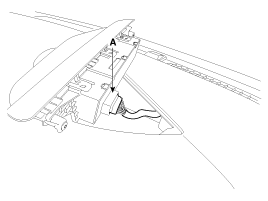
Disconnect the multi display facia panel connector (A).
|
| 13. |
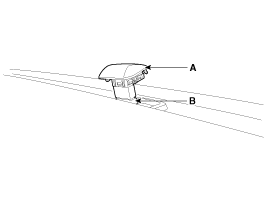
Using a screwdriver or remover, remove the photo sensor (A).
|
| 14. |
Disconnect the photo sensor connector (B).
|
| 15. |
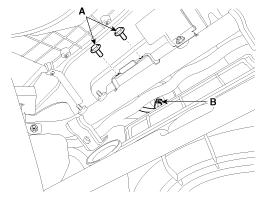
Loosen the mounting bolts (A).
|
| 16. |
Disconnect the passenger's airbag connector (B).
|
| 17. |
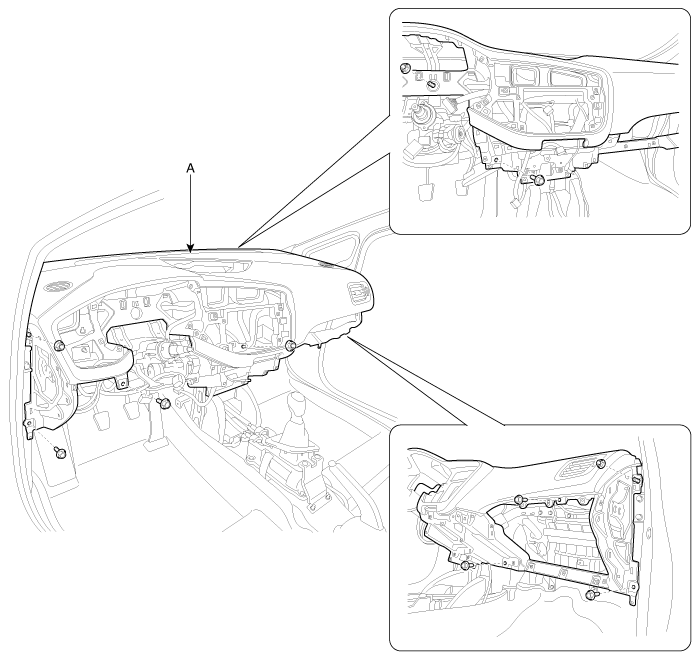
After loosening the mounting bolts and nuts, then remove the main crash
pad assembly (A).
|
| 18. |
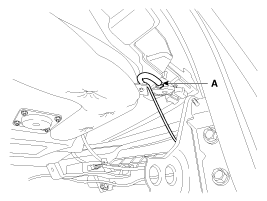
Right before removing the main crash pad, slightly lift the main crash
pad and remove the twitter speaker connector and mounting clip (A) located
at the end of both side.
|
| 19. |
Install in the reverse order of removal.
|

 Main Crash Pad Assembly Components and components location
Component Location
1. Main crash pad assembly
...
 Cowl Cross Bar Assembly Components and components location
Component Location
1. Cowl cross bar assembly
...
Other information:
: Adjusting the Seatbelts During Pregnancy
WARNING: Always ride and drive
with your seatback upright and properly
fasten your seatbelt. Fit the lap portion
of the seatbelt snugly and low across
the hips. Position the shoulder portion of
the seatbelt across your chest. Pregnant
women must follow this practice. See
the following figure. ...
Kia Cee'd JD Owners Manual: Tire chains
Since the sidewalls of radial tires are
thinner, they can be damaged by mounting
some types of snow chains on them.
Therefore, the use of snow tires is recommended
instead of snow chains. Do
not mount tire chains on vehicles
equipped with aluminum wheels; snow
chains may cause damage ...
© 2017-2026 www.kceed.com
