Kia Cee'd: Interior Trim / Luggage Side Trim Repair procedures
| • |
Put on gloves to protect your hands.
|
|
| • |
Use a plastic panel removal tool to remove interior trim pieces
to protect from marring the surface.
|
| • |
Take care not to bend or scratch the trim and panels.
|
|
| 1. |
Remove the rear wheel house trim.
(Refer to Interior Trim - "Rear Wheel House Trim")
|
| 2. |
Remove the rear transverse trim.
(Refer to Interior Trim - "Rear Transverse Trim")
|
| 3. |
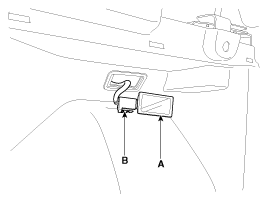
Using a screwdriver or remover, remove the luggage lamp (A).
|
| 4. |
Disconnect the luggage lamp connector (B).
|
| 5. |
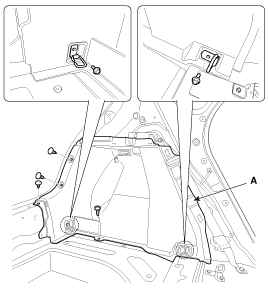
After loosening the mounting bolts, screw, clips, then remove the luggage
side trim (A).
|
| 6. |
Install in the reverse order of removal.
| •
|
Replace any damaged clips.
|
|
|
[3Door]
| • |
Use a plastic panel removal tool to remove interior trim pieces
to protect from marring the surface.
|
| • |
Take care not to bend or scratch the trim and panels.
|
| • |
Put on gloves to protect your hands.
|
|
| 1. |
Remove the rear wheel house trim.
(Refer to Interior Trim - "Rear Wheel House Trim")
|
| 2. |
Remove the rear transverse trim.
(Refer to Interior Trim - "Rear Transverse Trim")
|
| 3. |
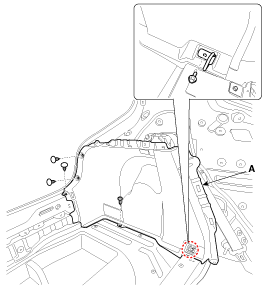
After loosening the mounting bolt, screw, clips, then remove the luggage
side trim (A).
|
| 4. |
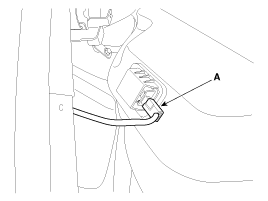
Disconnect the luggage lamp connector (A).
|
| 5. |
Install in the reverse order of removal.
| •
|
Replace any damaged clips.
|
| •
|
Make sure the connector is plugged in properly.
|
|
|
Component Location
[5Door]
1. Luggage side trim
[3Door]
1. Luggage side trim
...
Component Location
[5Door]
1. Rear pillar trim
[3Door]
1. Rear pillar trim
...
Other information:
Kia Cee'd JD Service Manual: Components and components location
Component Location
1. Instrument cluster assembly
2. Seat belt switch
3. Vehicle speed sensor
4. Engine coolant temperature sensor
5. Oil pressure switch
6. Brake fluid level warning switch
7. Parking brake switch
8. Door switch
...
Kia Cee'd JD Owners Manual: Windshield wipers (front)
Operates as follows when the ignition
switch is turned ON.
: For a single wiping cycle, move
the
lever to this position and release it.
The wipers will operate continuously if
the lever is held in this position.
O : Wiper is not in operation
--- :Wiper operates intermittently at the
s ...



 Luggage Side Trim Components and components location
 Rear Pillar Trim Components and components location