
Kia Cee'd: Dual Clutch Transmission Control System / Input Speed Sensor 1 Repair procedures
Kia Cee'd JD Service Manual / Dual Clutch Transmission(DCT) System / Dual Clutch Transmission Control System / Input Speed Sensor 1 Repair procedures
| Inspection |
Refer to DTC code "P2765, P2766" Input Shaft Speed Sensor.
| Removal |
| 1. |
Turn off the ignition switch and then disconnect the battery (-) cable.
|
| 2. |
Remove the under cover.
|
| 3. |
Disconnect the input shaft speed sensor connector (A).
|
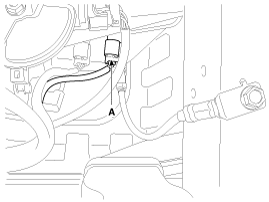
| 4. |
Loosen the mounting bolt and then remove the input shaft speed sensor
(B).
|
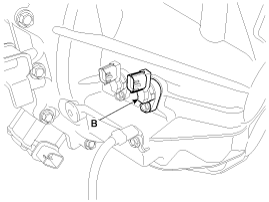
| Installation |
| 1. |
Install in the reverse order of removal.
|
 Input Speed Sensor 1 Schematic diagrams
Schematic Diagrams
...
 Input Speed Sensor 2 Description and operation
Description
The input shaft speed sensor is important in that it detects the input shaft
RPM and sends this information to the Transmission Control Module (TCM).
It provides i ...
Other information:
Kia Cee'd JD Service Manual: Driver Airbag (DAB) Module and Clock Spring Repair procedures
Removal
1.
Set the front tires straight-ahead before removing the steering wheel.
If the steering wheel and the front tires are not set straight
ahead toget ...
: Changing a Road Wheel
Changing a Flat Tire
WARNING: Never place anything
between the vehicle jack and the ground.
WARNING: Never place anything
between the vehicle jack and your
vehicle.
WARNING: To help prevent your
vehicle from moving when changing a
wheel, shift the transmission into park
(P), set the parking br ...
© 2017-2026 www.kceed.com
