
Kia Cee'd: IMS (Integrated Memory) / IMS (Integrated Memory System) module Repair procedures
Kia Cee'd JD Service Manual / Body Electrical System / IMS (Integrated Memory) / IMS (Integrated Memory System) module Repair procedures
| Removal |
| 1. |
Remove the negative (-) battery terminal.
|
| 2. |
Remove the driver seat in the car.
(Refer to Body - "Front Seat Assembly")
|
| 3. |
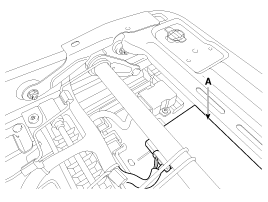
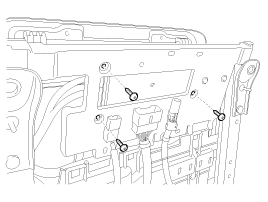
Remove the IMS module (A) after loosening 3 screws in the bottom of
seat.
|
| 4. |
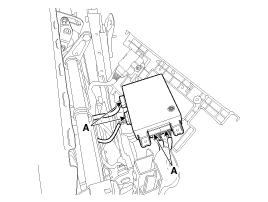
Disconnect the IMS module connector (A).
|
| Installation |
| 1. |
Install the IMS module after connecting the connector.
|
| 2. |
Install the front seat.
|

 Description and operation
Description
system outline
An optimal seat position set by a driver can be memorized in Power seat unit
by IMS SW, which enables restoration of seat position set by the ...
 IMS Power Seat Control Schematic diagrams
Circuit diagram
...
Other information:
: Selecting a Drive Mode - Plug-In Hybrid Electric Vehicle (PHEV)
and Hybrid Electric Vehicle (PHEV)
Selecting a Drive Mode - Plug-In Hybrid Electric Vehicle (PHEV)
To select drive modes, use the console
mounted control.
Note: Drive mode changes may not be
available when the ignition is off.
Note: Button icon shown may vary from
your vehicle.
Note: Selected drive mode displays in the
informati ...
Kia Cee'd JD Service Manual: Troubleshooting
Troubleshooting
Symptom
Possible cause
Remedy
Hard steering
Improper front wheel alignment
Excessive turning resistance of lower arm ball joint
Low tire pressure
No power assist
Correct
...
© 2017-2026 www.kceed.com
