
Kia Cee'd: Hood / Hood Latch Components and components location
Kia Cee'd JD Service Manual / Body (Interior and Exterior) / Hood / Hood Latch Components and components location
| Component Location |
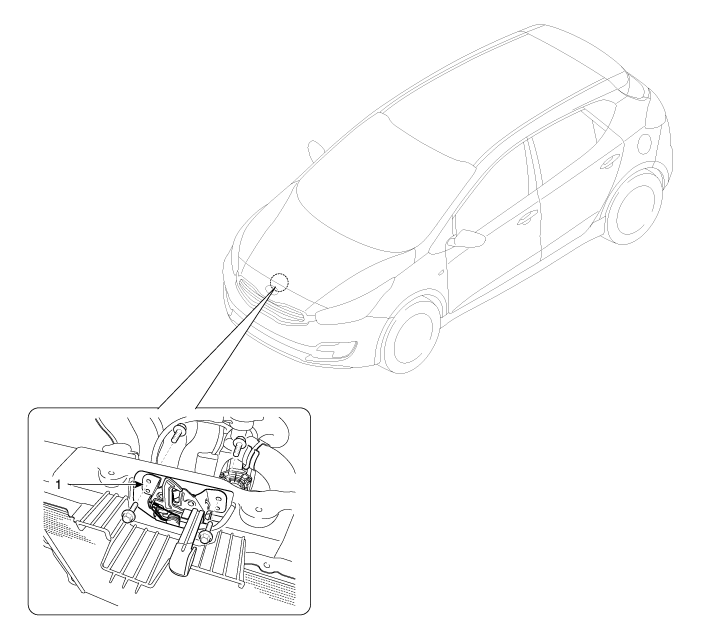
| 1. Hood latch assembly |
 Hood Latch Release Handle Repair procedures
Replacement
1.
Using a screwdriver or remover, remove the hood latch release handle
(A).
2.
Install in the reverse order of ...
 Hood Latch Repair procedures
Replacement
1.
Remove the front bumper cover.
(Refer to Front Bumper - "Front Bumper Cover")
2.
Remove the hood latch ...
Other information:
Kia Cee'd JD Service Manual: Smart Key Diagnostic Repair procedures
Inspection
Self Diagnosis With GDS
Smart key system defects can be quickly diagnosed with the GDS. GDS operates
actuator quickly to monitor, input/output value and self diagnosis.
The following three features will be major problem in SMART KEY system.
1.
...
: Passive Anti-Theft System. Anti-Theft Alarm System
Passive Anti-Theft System
What Is the Passive Anti-Theft System
The passive anti-theft system prevents
someone from starting the vehicle with an
incorrectly coded key.
How Does the Passive Anti-Theft System Work
The passive anti-theft system arms when
you switch the ignition off.
It disarms when ...
© 2017-2026 www.kceed.com
