
Kia Cee'd: Lighting / High Beam Assist (HBA)
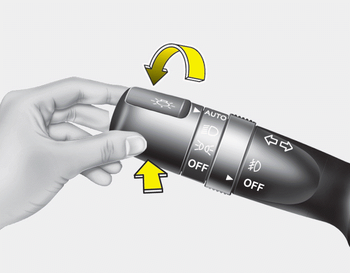
The high beam assist is a system that automatically adjusts headlamp range (switches between high beam and low beam) according to the brightness of other vehicles and road conditions.
 Flashing headlights
Pull the lever towards you. It will return to
the normal position when released. The
headlight switch does not need to be on
to use this flashing feature. ...
 Operating condition
1.Place the light switch in the AUTO
position.
2.Turn on the high beam by pushing the
lever away from you.
The high beam assist indicator will illuminate.
3.The High Beam Assist will turn on
...
Other information:
Kia Cee'd JD Owners Manual: Engine coolant temperature gauge
This gauge shows the temperature of the
engine coolant when the ignition switch
is ON.
Do not continue driving with an overheated
engine. If your vehicle overheats, refer
to “If the engine overheats” in chapter 6.
CAUTION
If the gauge pointer moves beyond
the normal range area tow ...
Kia Cee'd JD Service Manual: Alternator Components and components location
Components
1. OAD
(Overrunning Alternator Decoupler)
2. Front Bracket
3. Front Bearing
4. Stator
5. Rotor
6. Rear Bearing
7. Rear
Bracket
8. Brush Holder Assembly
9. Through Bolt
10. Rectifier Assembly
11. Rear Cov ...
