
Kia Cee'd: Lighting System / Hazard Lamp Switch Repair procedures
Kia Cee'd JD Service Manual / Body Electrical System / Lighting System / Hazard Lamp Switch Repair procedures
| Inspection |
| 1. |
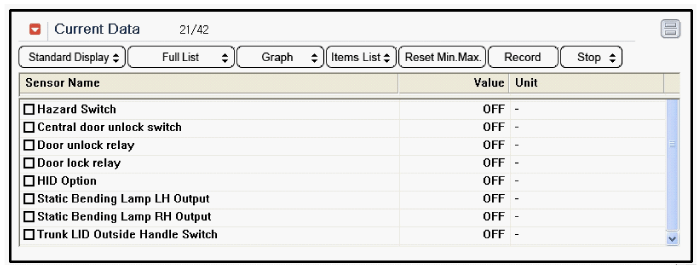
It will be able to diagnose defects of hazard switch with GDS quickly.
GDS can operates actuator forcefully, input/output value monitoring
and self diagnosis.
|
| 2. |
Select model and "BCM".
|
| 3. |
Select the "SJB" to check.
|
| 4. |
Select "Current data", if you will check current data of hazard switch.
It provides input/output status of SJB.
|
| Removal |
| 1. |
Disconnect the negative (-) battery terminal.
|
| 2. |
Remove the center airvent duct.
(Refer to Body - "Cluster Fascia Panel")
|
| 3. |
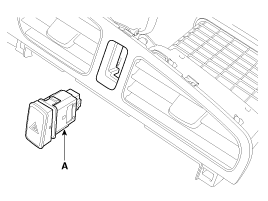
Remove the hazard switch (A) after disengaging the clip from the center
airvent duct.
|
| Installation |
| 1. |
Install the hazard switch to the center airvent duct.
|
| 2. |
Install the center airvent duct.
|
 License Lamp Repair procedures
Removal
[5Door]
1.
Disconnect the negative (-) battery terminal.
2.
Remove the license lamp assembly after pushing the fixi ...
 Rheostat Repair procedures
Inspection
1.
Disconnect the negative (-) battery terminal.
2.
Remove the crash pad lower panel.
(Refer to Body - "Crash P ...
Other information:
Kia Cee'd JD Service Manual: Input Speed Sensor 1 Specifications
Specification
Input Speed Sensor 1
▷ Type: Hall effect sensor
▷ Specifications
Item
Specifications
Output voltage (V)
Low
0.7
High
1.4
...
: Changing the Format of the Map
Display the map in one of the following
formats:
A two-dimensional map with the
direction you are traveling toward the
top of the screen.
A two-dimensional map with north
toward the top of the screen.
A three-dimensional map with the
direction you are traveling toward the
front.
Zoom ...
© 2017-2026 www.kceed.com
