
Kia Cee'd: Your vehicle at a glance / Exterior overview (front)
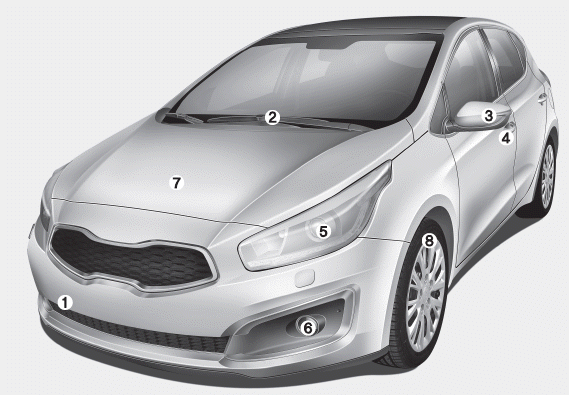
1. Front removable towing hook
2. Front windscreen wiper
3. Outside rearview mirror
4. Door lock
5. Head lamp
6. Front fog lamp
7. Bonnet
8. Tyre and wheel

 Exterior overview (rear)
1. Roof antenna
2. Rear window defroster
3. Rear wiper
4. Door lock
5. Rear parking assist system
6. Child-protector rear door lock
7. Fuel filler
8. Rear towing hook
9. Rear combination lam ...
Other information:
Kia Cee'd JD Owners Manual: Shift lock system
For your safety, the Dual clutch transmission
has a shift lock system which prevents
shifting the transaxle from P (Park)
or N (Neutral) into R (Reverse) unless
the brake pedal is depressed.
To shift the transaxle from P (Park) or N
(Neutral) into R (Reverse):
1. Depress and hold the bra ...
Kia Cee'd JD Service Manual: General information
Towing
If the vehicle needs to be towed, call a professional towing service. Never
tow vehicle with just a rope or chain. It is very dangerous.
Emergency Towing
There are three popular methods of towing a vehicle :
–
The operator loads the ...
