
Kia Cee'd: Emergency Call System / Emergency Call (eCall) Button Repair procedures
Kia Cee'd JD Service Manual / Body Electrical System / Emergency Call System / Emergency Call (eCall) Button Repair procedures
| Removal |
| 1. |
Disconnect the negative (-) battery terminal.
|
| 2. |
Remove the overhead console lamp.
(Refer to Lighting System - "Overhead Console Lamp")
|
| 3. |
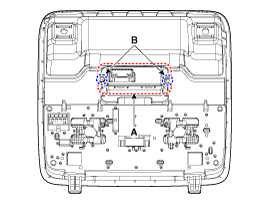
Remove the eCall button (A) after loosening the mounting screws (B).
|
| Installation |
| 1. |
Install the eCall button.
|
| 2. |
Install the overhead console lamp after connecting the connector.
|
| 3. |
Connect the negative (-) battery terminal.
|


Other information:
Kia Cee'd JD Service Manual: Oil Pan Components and components location
Components
1. Gasket
2. Oil screen
3. Oil pan
4. Drain plug gasket
5. Drain plug
...
Kia Cee'd JD Owners Manual: Seat belt warning
Driver’s seat belt warning (1)
As a reminder to the driver, the seat belt
warning light will illuminate for approximately
6 seconds each time you turn the
ignition switch ON regardless of belt fastening.
If the driver’s seat belt is unfastened after
the ignition switch is ON, the sea ...
© 2017-2026 www.kceed.com
