
Kia Cee'd: Charging System / DC DC Converter Description and operation
Kia Cee'd JD Service Manual / Engine Electrical System / Charging System / DC DC Converter Description and operation
| Description |
Due to the considerably more frequent occurrence of starting operations, the
electrical load that occurs often leads to voltage dips in the vehicle network.
In order to stabilize the power supply for certain voltage-sensitive electrical
components, a DC/DC converter is used in conjunction with the ISG function.
The DC DC converter supplies the relay with a voltage that also remains constant
during the starting operation.
The DC/DC converter is fitted at the behind of the glove box.
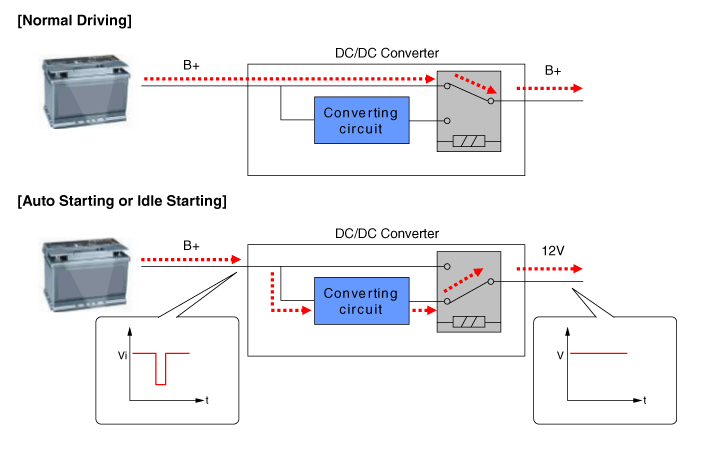
Via the test leads for input voltage and the start relay , the electronics decide
whether the power is supplied to the output via the bypass or the DC/DC converter.
In the bypass mode, the on-board supply voltage is not fed across the DC/DC
converter, rather is transferred directly to the outputs. In the booster phase,
the vehicle voltage is adapted.
| Operation Principle |
|

 Alternator Repair procedures
Removal
1.
Disconnect the battery negative terminal.
2.
Loosen the mounting bolts (A) and then, turn the adjusting bolt (B)
clockwise ...
 DC DC Converter Components and components location
Component Location
1. DC/DC converter (LHD)
2. DC/DC converter (RHD)
...
Other information:
: Emergency Towing
Hybrid Electric Vehicle (HEV)/Plug-In Hybrid Electric
Vehicle (PHEV)
If your vehicle becomes inoperable without
access to wheel dollies or a vehicle
transport trailer, it can be flat-towed with
all wheels on the ground, regardless of the
powertrain and transmission configuration,
under the fol ...
Kia Cee'd JD Owners Manual: Dual clutch transmission operation
The dual clutch transmission has 7 (or 6)
forward speeds and one reverse speed.
The individual speeds are selected automatically
in the D (Drive) position.
WARNING
To reduce the risk of serious injury
or death:
ALWAYS check the surrounding
areas near your vehicle for people,
es ...
© 2017-2026 www.kceed.com
