
Kia Cee'd: Floor Console / Console Armrest Repair procedures
Kia Cee'd JD Service Manual / Body (Interior and Exterior) / Floor Console / Console Armrest Repair procedures
| Replacement |
|

|

| 1. |
Remove the rear console cover.
(Refer to Floor Console - "Rear Console Cover")
|
| 2. |
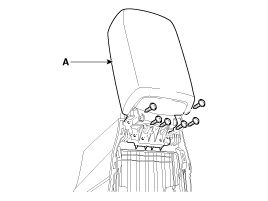
After loosening the mounting screws, then remove the console armrest
(A).
|
| 3. |
Install in the reverse order of removal.
|

 Console Armrest Components and components location
Component Location
1. Console armrest
...
 Crash Pad
...
Other information:
Kia Cee'd JD Service Manual: Repair procedures
Adjustment
1.
After loosening the hinge (A) mounting bolt, adjust the hood (B) by
moving it up or down, or right or left.
2.
Adjust the hood height by turning the hood overslam bumpers (C).
3.
Afte ...
Kia Cee'd JD Service Manual: Door Scuff Trim Repair procedures
Replacement
[5Door]
•
Put on gloves to protect your hands.
•
...
© 2017-2026 www.kceed.com
