
Kia Cee'd: Crash Pad / Components and components location
Kia Cee'd JD Service Manual / Body (Interior and Exterior) / Crash Pad / Components and components location
| Components (1) |
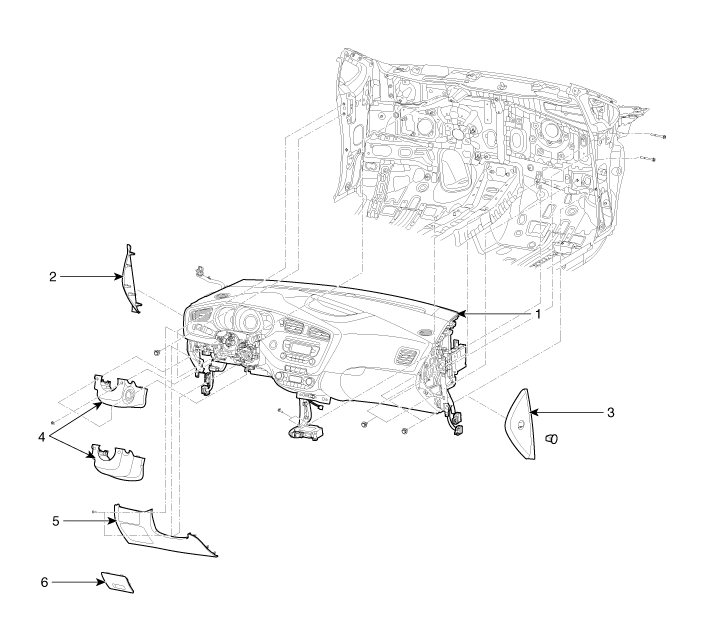
| 1. Main crash pad assembly
2. Crash pad side cover [LH] 3. Crash pad side cover [RH] |
4. Steering column lower shroud
panel 5. Crash pad lower panel 6. Fuse box cover |
| Components (2) |
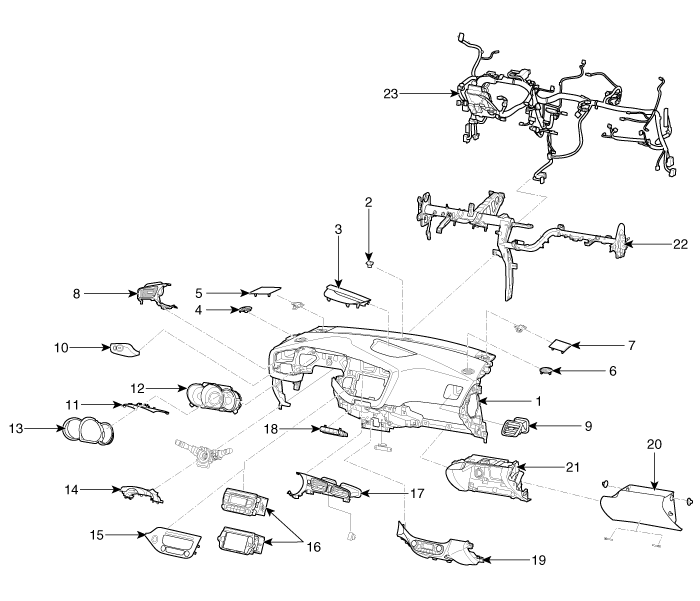
| 1. Main crash pad assembly
2. Photo sensor 3. Multi display facia panel 4. Side def nozzle [LH] 5. Side speaker grill [LH] 6. Side def nozzle [RH] 7. Side speaker grill [RH] 8. Side airvent duct [LH] 9. Side airvent duct [RH] 10. Crash pad garnish [LH] 11. Cluster fascia upper panel 12. Instrument cluster assembly |
13. Cluster fascia cylinder panel
14. Steering column upper shroud panel 15. Center fascia panel 16. Audio assembly 17. Center airvent duct 18. Center swtich 19. Crash pad center lower panel 20. Glove box 21. Glove box housing 22. Cowl cross bar assembly 23. Crash pad main wiring harness |
 Crash Pad
...
 Cluster Fascia Panel Components and components location
Component Location
1. Cluster fascia panel
...
Other information:
Kia Cee'd JD Service Manual: Transmission Control Module (TCM) Repair procedures
Inspection
Transmission Control Module (TCM) Inspection
Procedure
1.
Inspecting TCM ground circuit: Measure the resistance between the TCM
and chassis ground.
(Check the terminal connected to the chassis ground while using the
ba ...
Kia Cee'd JD Service Manual: Ignition Coil Repair procedures
Removal
1.
Disconnect the battery nagative terminal.
2.
Remove the engine cover.
3.
Disconnect the ignition coil connector (A).
...
© 2017-2026 www.kceed.com
