
Kia Cee'd: Interior features / Barrier net (wagon)
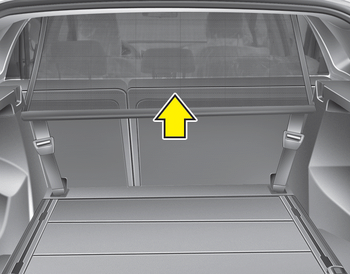
Your vehicle is equipped with a barrier net.
When you load some cargoes on the rear seat or rear cargo area, you must install the barrier net behind front seatback or rear seatback.
It is designed to help protect the heads of the occupants by obstructing objects flying forward in frontal collisions.
There are eight hook holders on both side of the headliner over the headrests for upper side fixation and on the floor behind the front seats or rear seats for lower side fixation.
 Cargo area cover
(3 Door and 5 Door)
Cargo area cover
(3 Door and 5 Door)
Use the cover to hide items stored in the
cargo area.
The cargo area cover will be lifted when
the tailgate is opened. Disconnect the
strap (1) from holder if you want to return
the cover t ...
 To install the barrier net
1. Open the cover (if equipped) for the
holder position (1) or (2) you want to
install.
2. Compress the one side net upper shaft
to length direction before insert the net
upper shaft into t ...
Other information:
Kia Cee'd JD Owners Manual: Fuses
■ Blade type
■ Cartridge type
■ Multi fuse type
■ Battery fuse terminal (BFT)
A vehicle’s electrical system is protected
from electrical overload damage by
fuses.
This vehicle has 3 (or 4) fuse panels, one
located in the driver’s side panel bolster,
others in the eng ...
Kia Cee'd JD Service Manual: Center Pillar Trim Repair procedures
Replacement
(5Door)
[Center pillar lower trim]
•
Put on gloves to protect your hands.
...
