
Kia Cee'd: AVN System / AVN Head Unit Components and components location
Kia Cee'd JD Service Manual / Body Electrical System / AVN System / AVN Head Unit Components and components location
| Components |
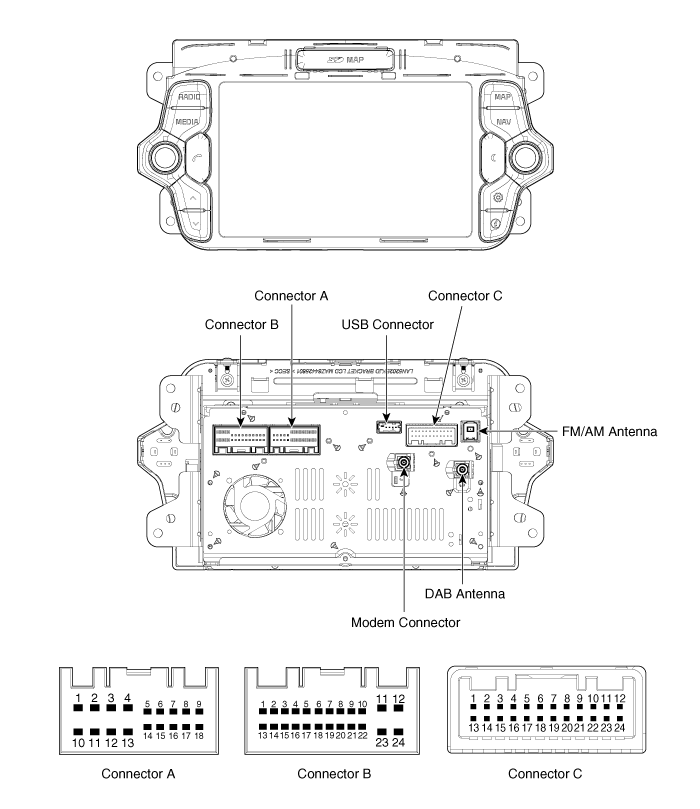
Connector Pin Information
|
No. |
Connector A |
Connector B |
Connector C |
|
1 |
Rear left speaker (+) |
MM CAN High |
- |
|
2 |
Front left speaker (+) |
- |
- |
|
3 |
Front right speaker (+) |
- |
- |
|
4 |
Rear right speaker (+) |
Steering wheel key |
- |
|
5 |
- |
- |
|
|
6 |
- |
- |
- |
|
7 |
- |
AUX video |
- |
|
8 |
Illumination (+) |
AUX Audio R |
- |
|
9 |
Reverse |
AUX Audio ground |
- |
|
10 |
Rear left speaker (-) |
MIC Signal (+) |
- |
|
11 |
Front left speaker (-) |
Battery (+) |
- |
|
12 |
Front right speaker (-) |
Battery (+) |
- |
|
13 |
Rear right speaker (-) |
MM CAN Low |
- |
|
14 |
- |
Auto light |
- |
|
15 |
- |
P Position |
- |
|
16 |
Door unlock status |
Speed |
- |
|
17 |
Illumination (-) |
Steering wheel key ground |
- |
|
18 |
ANT power |
ACC |
- |
|
19 |
|
AUX Video ground |
- |
|
20 |
AUX Detect |
- |
|
|
21 |
AUX Audio left |
Camera shield ground |
|
|
22 |
MIC Signal (-) |
Camera vidieo ground |
|
|
23 |
Ground |
Camera vidieo |
|
|
24 |
Ground |
Camera power |
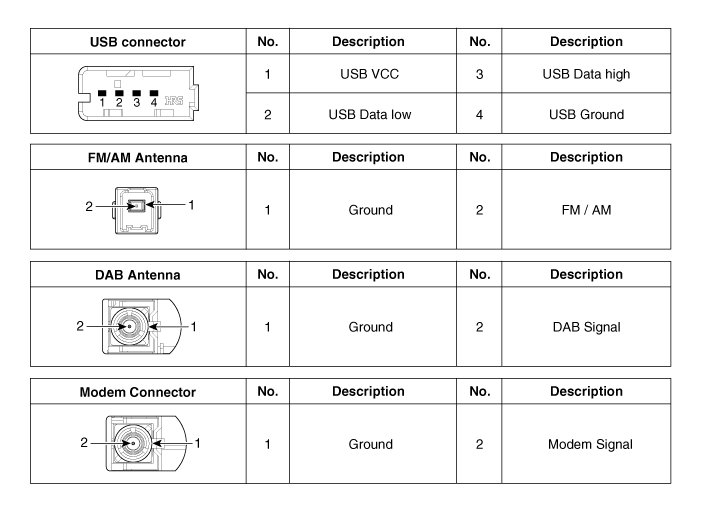
 Description and operation
Description
Limitations Of The Navigation system
GPS Signal Reception State
As the GPS satellite frequency is received/transmitted in straight lines, reception
may not work ...
 AVN Head Unit Repair procedures
Removal
AVN Head Unit
•
Take care not to scratch the center fascia panel and rela ...
Other information:
Kia Cee'd JD Owners Manual: Applying the parking brake
To apply the EPB (electric parking
brake):
Pull up the EPB switch.
Make sure the warning light comes on.
✽ NOTICE
On a steep incline or when pulling a
trailer if the vehicle does not stand still,
do as follows:
1. Apply the EPB.
2. Pull up the EPB switch for more than
3 seconds.
...
Kia Cee'd JD Service Manual: Front Oil Seal Repair procedures
Removal and Installation
1.
Crankshaft damper pulley.
(Refer to Timing System - "Damper Pulley")
2.
Remove the front oil seal.
...
© 2017-2026 www.kceed.com
