
Kia Cee'd: Front seat / Automatic adjustment
The driver’s seat can be adjusted by using the control switches located on the outside of the seat cushion. Before driving, adjust the seat to the proper position so as to easily control the steering wheel, pedals and switches on the instrument panel.
WARNING
The power seat is operable with the ignition OFF.
Therefore, children should never be left unattended in the car.
CAUTION
- The power seat is driven by an electric motor. Stop operating once the adjustment is completed. Excessive operation may damage the electrical equipment.
- When in operation, the power seat consumes a large amount of electrical power. To prevent unnecessary charging system drain, don’t adjust the power seat longer than necessary while the engine is not running.
- Do not operate two or more power seat control switches at the same time. Doing so may result in power seat motor or electrical component malfunction.
Forward and rearward
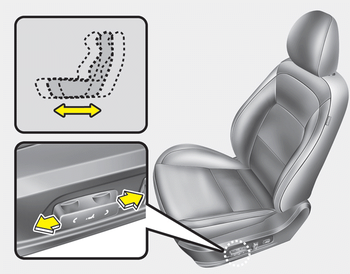
1. Push the control switch forward or rearward to move the seat to the desired position.
2. Release the switch once the seat reaches the desired position.
Seatback angle
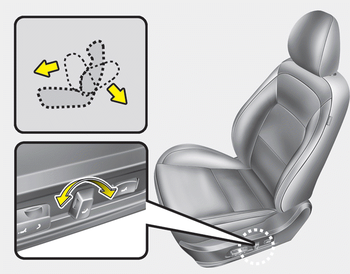
1. Push the control switch forward or rearward to move the seatback to the desired angle.
2. Release the switch once the seat reaches the desired position.
Seat cushion height
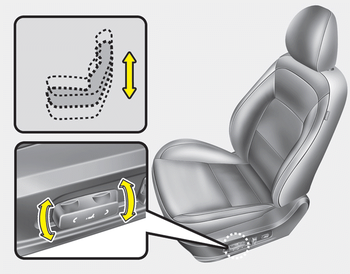
1. Pull the front portion of the control switch up to raise or down to lower the front part of the seat cushion. Pull the rear portion of the control switch up to raise or down to lower the seat cushion.
2. Release the switch once the seat reaches the desired position.
Lumbar support
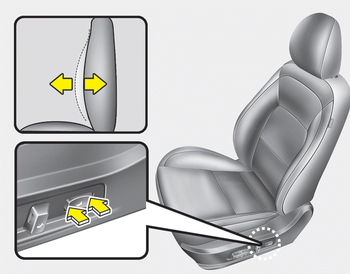
The lumbar support can be adjusted by pressing the lumbar support switch on the side of the seat.
1. Press the front portion of the switch to increase support, or the rear portion of the switch, to decrease support.
2. Release the switch once it reaches the desired position.
 Manual adjustment
Forward and backward
To move the seat forward or backward:
1. Pull the seat slide adjustment lever up
and hold it.
2. Slide the seat to the position you desire.
3. Release the lever and make s ...
 Driver position memory system
A driver position memory system is provided
to store and recall the driver seat
position with a simple button operation.
By saving the desired position into the
system memory, different driv ...
Other information:
: Opening the Liftgate
Press the control button to unlatch the
liftgate and then lift to open.
Note: Be careful when opening or closing
the liftgate in a garage or other enclosed
area to avoid damaging the liftgate.
Note: Do not hang anything, for example a
bike rack, from the glass or liftgate. This
could damage th ...
: Personal Safety System™
What Is the Personal Safety System
An advanced safety system that protects
occupants in frontal crashes.
How Does the Personal Safety System Work
This system provides an improved level of
frontal crash protection to front seat
occupants and is designed to reduce the
risk of airbag-related injuri ...
